AI TOOLS
FOUNDATIONS
Use AI With More Clarity, Confidence and Control
A practical guide for people who want AI to support their work without replacing their thinking.
Welcome to the MMO Essentials Foundations Library
Every online business is built on foundations.
Unfortunately, many people are encouraged to chase shortcuts before they understand the basics.
At MMO Essentials, we believe in Clarity Before Complexity.
Each Foundation Workbook focuses on one practical skill you can understand, apply, and build upon.
"Build the Foundation. The Rest Will Follow".
Inside This Workbook
Opening Note
Who This Workbook Is For
What This Workbook Is Not
Why AI Tools Matter When You Want Clearer Support
The Simple AI Foundation Map
Part 1: Choose the Right Task
Part 2: Give Clear Instructions
Part 3: Review Before You Use
Part 4: Add Your Human Touch
Part 5: Build Useful Business Assets
Part 6: Save What Works
Part 7: Improve Through Real Use
Common AI Tools Mistakes
Reader Toolkit
Common Questions
7-Day Build
MMO Essentials Build Log
Continue Your Journey
About MMO Essentials
Opening Note
AI can be useful.
It can also create a surprising amount of confusion.
One person tells you to learn advanced prompting. Another tells you to collect hundreds of prompts. Someone else insists you need several AI tools before you can begin.
Before long, learning AI starts to feel like another full-time job.
You may also have tried to solve that problem by collecting prompts, subscribing to several tools, following tutorials, or asking AI to create complete business assets before you had a clear process for reviewing them.
Perhaps the outputs looked polished but felt generic. Perhaps the facts needed checking, the tone sounded unfamiliar, or the first answer created more editing than starting from your own notes would have done.
That experience is not wasted. It has probably shown you which tasks AI handles well, where it needs more context, and why a finished-looking response is not the same as a finished business asset.
That is not what we are doing here.
At MMO Essentials, AI is a practical support tool. It can help you organise ideas, create first versions, understand unfamiliar terms, plan content and build useful online business assets.
But it still needs clear instructions.
It still needs checking.
And it still needs you.
This Foundation will help you understand where AI fits, how to guide it clearly, how to review what it gives you, and how to use it without losing your own judgment or voice.
The goal is not to become an AI expert.
The goal is to become more confident using AI for the tasks that genuinely help you move forward.
CORE PURPOSE
Use AI to support better thinking, clearer action and useful asset creation. AI can help with the first version. You remain responsible for the final version.
Who This Workbook Is For
This workbook may help you if:
You want a clear introduction to AI tools without getting buried in technical language or advanced prompting systems.
New tools seem to appear every week, and you feel unsure which ones genuinely deserve your attention.
You want practical help with planning, writing, research, organisation, and creating useful business assets.
You want to use AI without publishing generic content that could belong to anyone.
You have collected prompts, watched tutorials, or joined AI programmes but still do not have one reliable working process.
You have tried several AI tools but found that moving between them created more decisions rather than better work.
You have paid for subscriptions or software that looked useful but never became part of a repeatable system.
You have AI-generated drafts, outlines, emails, pages, or content sitting unfinished because the results did not sound like you.
You have used AI successfully for isolated tasks but still want to understand how it fits into the wider business.
You want AI to support your judgment rather than quietly taking over every decision.
You have limited time and want to begin with one useful task instead of learning every tool available.
You may be using AI for the first time. You may also be returning with prompt folders, abandoned drafts, paid tools, and a clearer idea of what has not worked. Either way, you are not starting from nothing.
What This Workbook Is Not
This is not a promise that AI will build your business for you.
This is not a giant prompt collection.
This is not a guide to every AI tool available.
This is not a shortcut to instant income.
This is not a technical explanation of how artificial intelligence works.
This is not a reason to replace your ideas, experience, judgment, or voice.
This is not a push-button system that removes the need to review your work.
You may already have prompt packs, subscriptions, saved chats, AI drafts, custom instructions, or several tools competing for your attention. You do not need to delete everything or begin again automatically. The goal is to identify what helps you complete useful work, keep what supports a clear process, and stop carrying tools or prompts that have no practical job.
This workbook focuses on building—or rebuilding—one simple AI-assisted process you can understand, review, document, and improve.
MMO ESSENTIALS REALITY CHECK
A new tool does not automatically create progress. One tool you understand is usually more useful than five tools you barely use.
Why AI Tools Matter When You Want Clearer Support
AI tools can reduce the friction around tasks that often delay useful work before it begins.
They can help you:
turn rough notes into a clear outline
simplify unfamiliar language
generate questions your audience may ask
compare ideas before making a decision
create a first version of an email, page or article
repurpose one useful asset into several formats
organise feedback and document what you learn
The useful part is not that AI can produce a lot of words.
The useful part is that it can help you move from a blank page to something you can review, improve and use.
SIMPLE SHIFT
Do not ask, "How can I use AI for everything?"
Ask, "Which one task could AI help me complete more clearly today?"
What AI Can and Cannot Do
✅ Organise ideas
❌ Guarantee every fact is correct
✅ Create outlines
❌ Know your audience without context
✅ Draft first versions
❌ Replace your judgment
✅ Simplify explanations
❌ Create real experience
✅ Compare options
❌ Know your opinion unless you provide it
✅ Repurpose content
❌ Guarantee business results
✅ Spot gaps to review
❌ Decide what your brand should stand for
The Simple AI Foundation Map
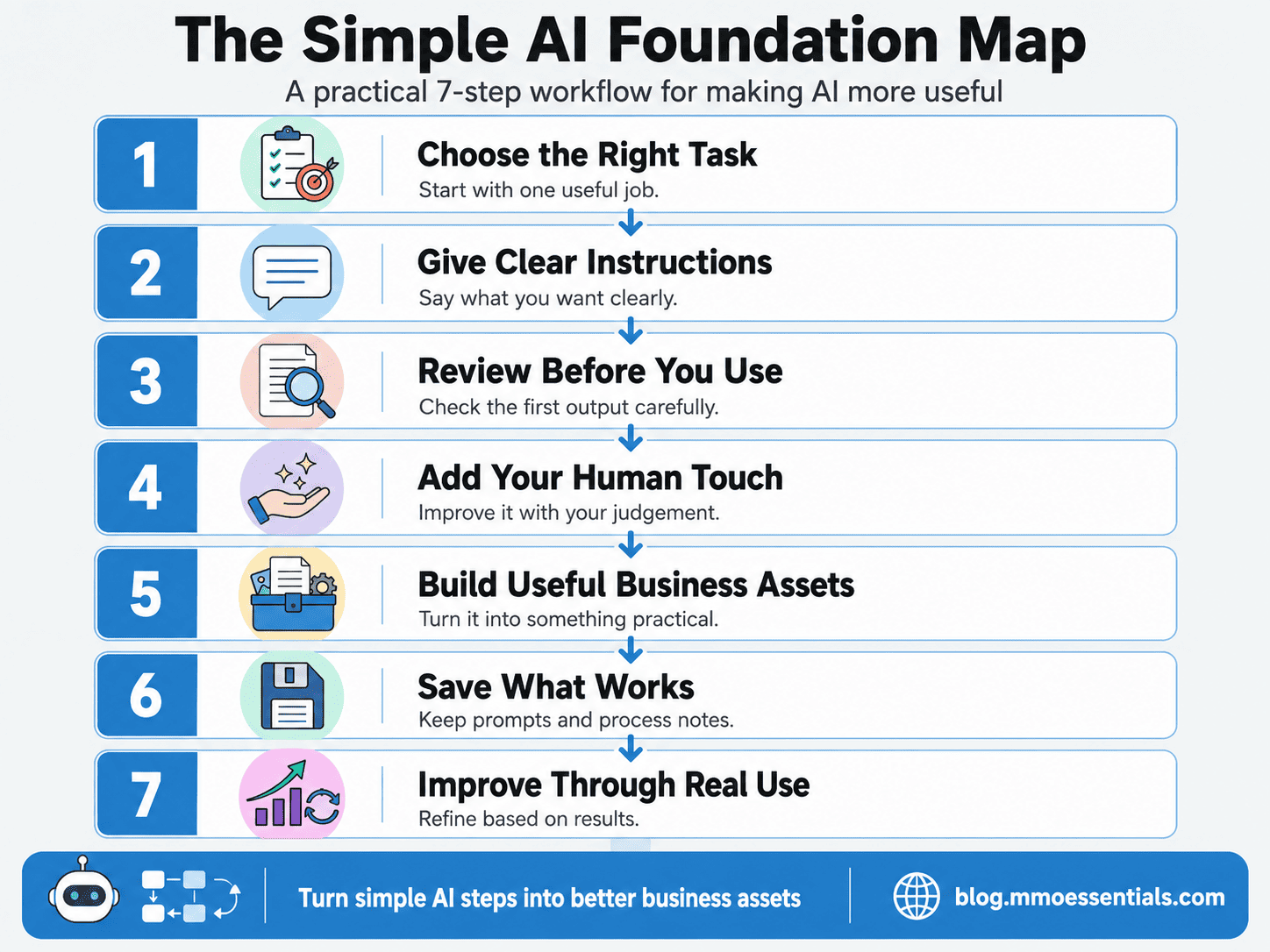
The Simple AI Foundation Map can help you plan a new AI-assisted task or review a process you already use.
If you already have saved prompts, custom instructions, subscriptions, drafts, or repeated workflows, do not begin by adding another tool. Choose one real task and trace what happens from your first instruction to the finished asset.
Ask:
What did I need AI to help me do?
What information did I provide?
What did AI produce?
What needed checking or changing?
What did I add from my own experience or judgment?
Did the process help me finish something useful?
A prompt folder can look organised while quietly functioning as a digital attic. The useful part is the process you can repeat.
This is the full process.
You choose the task. AI helps with a first version. You check it, shape it, and decide whether it is useful.
The value comes from the finished asset, not from how many responses the tool can generate.
Part 1: Choose the Right Task
Start with one job that already needs doing.
If you already use AI regularly, choose one task that repeatedly causes wasted time, weak output, or unfinished drafts. Do not audit your entire AI life before lunch. One task is enough.
You might review:
a blog-post outline that always becomes too broad
emails that sound polished but unlike you
research notes that include claims you cannot verify
prompt collections you save but never reuse
repurposed content that loses the meaning of the original
several tools performing the same job
The goal is to identify one place where clearer instructions, stronger checking, or a simpler tool choice would improve the finished asset.
Good first tasks are clear, limited, and easy to review.
Examples include creating a blog outline, simplifying a paragraph, listing clear audience questions, planning a short video, comparing two titles, or turning notes into a checklist.
FOUNDATION BUILDER
Complete this sentence:
I want AI to help me __________ so I can __________.
AVOID THIS MISTAKE
Do not open an AI tool with no task in mind and hope useful work appears. That usually creates more ideas, more tabs and no finished asset.
Part 2: Give Clear Instructions
AI works with the information you provide.
You do not need technical language. You need a clear request.
A useful request usually explains the task, audience, outcome, tone, format, context and anything to avoid.
SIMPLE PROMPT BUILDER
Help me create [task] for [audience].
The goal is [outcome].
Use a [tone] tone.
Include [key points].
Avoid [what not to include].
Present it as [format].
WHY THIS WORKS
AI does not automatically know who your reader is, what they understand or what the finished result needs to achieve. Clear context reduces guessing.
Part 3: Review Before You Use
The first response is a starting point, not the finished version.
Read it as if it came from someone else. Check the facts, the logic, the examples, and the tone.
A polished answer can still be wrong, vague, or unsuitable for your audience.
You may already have AI-created content published, scheduled, saved, or waiting inside a draft folder. Review it without assuming that every sentence must stay simply because the tool produced it quickly.
Check whether the output:
answers the correct question
includes claims that need verification
uses examples that are real
reflects your current audience and offer
sounds natural in your brand voice
contains unnecessary repetition
gives the reader one useful next step
If an output is partly useful, keep the useful structure and rebuild the rest. Previous generation time is not a reason to publish something you cannot confidently stand behind.
AI OUTPUT CHECK
Before using an AI response, ask yourself:
Is it clear?
Is it correct?
Is it useful?
Does it fit your audience?
Does it sound like you?
What needs your own experience, examples or personal touch?
MMO ESSENTIALS REALITY CHECK
AI can sound confident even when it is mistaken. Confidence is not evidence.
Part 4: Add Your Human Touch
AI can produce a clean first version, but clean is not the same as personal.
Add the details 'only' you can provide: your opinion, your example, your experience, your preferred language, and the way you naturally explain things.
Remove phrases you would never say. Replace vague advice with a practical next step.
BEFORE AND AFTER
Generic: "Leverage AI to maximise content efficiency."
Human: "Use AI to turn your rough notes into a first draft, then rewrite anything that does not sound like you."
MMO ESSENTIALS INSIGHT
AI should support your voice, not flatten it into the same polished language everyone else is publishing.
Part 5: Build Useful Business Assets
AI becomes more valuable when it helps you finish something you can keep, use and improve.
Focus on assets rather than random output.
If you already have AI drafts, do not measure their value by how complete they look. Measure them by whether they have a clear role in the business.
An outline may support a blog post.
A transcript may become a checklist.
A collection of audience questions may support an FAQ.
A comparison may help you choose between two ideas.
A generic forty-page draft with no audience, purpose, or next step is not automatically more valuable because it is longer. It may simply be wearing very formal trousers.
Choose one existing output and decide what useful asset it could become. Then verify it, shape it, add your own judgment, and finish that version before generating another one.
ASSETS AI CAN HELP YOU BUILD
Blog outlines and first drafts
Short video ideas and scripts
Email subject lines and first versions
Lead magnet structures
Landing page sections
Checklists and worksheets
FAQs and glossaries
Content calendars
Research questions
Simple process documents
FOUNDATION REALITY CHECK
Ten unfinished ideas are not more valuable than one completed asset.
Part 6: Save What Works
When a request produces a useful result, save it.
Keep the final request, the improved output, and a short note about what worked.
You do not need a huge prompt library. You need a small collection of instructions that help with tasks you actually repeat.
If you already have hundreds of saved prompts, review them by task rather than reading every line.
Group them into areas such as:
planning
research
drafting
editing
repurposing
checking
documentation
Keep the prompts that have produced useful, repeatable results. Improve the ones that nearly worked. Archive duplicates and anything you cannot connect to a real task.
A prompt earns its place when it helps you complete better work—not when it makes the folder look impressively full.
SIMPLE SAVING SYSTEM
Create one document or folder with four headings:
Task
Useful Request
What Changed
Final Asset
MMO ESSENTIALS INSIGHT
The goal is not to collect prompts. The goal is to build a working process you understand.
Part 7: Improve Through Real Use
You will learn more from using AI on one real task than from saving fifty tutorials about it.
After each task, make one improvement.
Maybe the audience needed to be clearer. Maybe the format was too long. Maybe the response needed a real example.
Small changes create better results over time.
MMO ESSENTIALS BUILD LOG
What did I ask AI to do?
What worked?
What needed changing?
What will I do differently next time?
SIMPLE SHIFT
Do not wait for the perfect prompt. Start with a clear request, review the response and improve through use.
A Few Practical Ways to Use AI
💎When the blank page wins
Give AI your rough notes and ask for a simple outline. Review the order before asking for a draft.
💎When a topic feels too technical
Ask for a plain-English explanation with one practical example. Then check the explanation against a reliable source.
💎When you have too many ideas
Ask AI to group them by audience problem, difficulty or next logical step. You still choose the priority.
💎When one asset needs to work harder
Ask AI to turn a finished blog post into a short video outline, email summary, FAQ and checklist. Review each version for fit.
💎When your writing feels generic
Give AI a sample of your natural writing and ask it to identify the tone, sentence rhythm and phrases that make it sound like you. Use that guidance to revise the draft.
Common AI Tools Mistakes
⚠️ Using AI before choosing the task
Start with the result you need, not the tool.
⚠️ Treating the first response as final
Review, correct, and improve it.
⚠️ Asking for too much at once
Break a large job into smaller steps.
⚠️ Trusting facts without checking
Verify claims, examples, links, and recommendations.
⚠️ Using language you would never say
Rewrite until the result sounds natural to you.
⚠️ Collecting prompts instead of building
Save only the requests that help you complete real work.
⚠️ Trying every new tool
Learn one useful tool before adding another.
⚠️ Sharing sensitive information
Avoid entering private customer, financial, login or confidential business information unless you understand how the tool handles it.
⚠️ Letting AI decide your brand
Use AI for support. Keep your values, positioning and final decisions human.
⚠️ Creating more content than you can use
Build one useful asset, publish or apply it, then create the next.
⚠️ Using Several Tools for the Same Unclear Task
Moving the same request between several tools does not automatically improve it. Clarify the task, context, and review criteria before adding another platform.
⚠️ Paying for Features You Have Not Connected to Real Work
A subscription may be useful, but access alone does not create value. Review whether the tool helps you complete a task you genuinely repeat.
⚠️ Keeping Every Output Because AI Created It Quickly
Fast generation can create a large editing backlog. Keep the ideas or structure that help, and remove anything inaccurate, generic, repetitive, or unnecessary.
⚠️ Using AI to Avoid Making the Decision
AI can compare options and explain trade-offs. It cannot decide what your brand should believe, promise, publish, or prioritise.
⚠️ Treating a Polished Answer as Evidence
Clear formatting and confident language do not prove that a fact, quote, example, recommendation, or source is correct. Verify anything important before publishing it.
⚠️ Building a Prompt Library Instead of a Working Process
Saving more instructions can feel productive while no asset gets finished. Keep the prompts that support tasks you actually complete.
⚠️ Letting AI Flatten Your Voice
A grammatically clean response may still sound unlike you. Add your own language, examples, decisions, humour, and practical point of view.
⚠️ Using AI-Generated Research Without Checking the Source
Treat research output as a starting point. Confirm important claims through reliable original sources before using them under your name.
Reader Toolkit
1. AI Quick-Start Checklist
What am I trying to create?
Who is it for?
What should the result help them do?
What should AI avoid?
What will I check before using it?
2. Simple Prompt Builder
COPY AND ADAPT
Help me create [task] for [audience].
The goal is [outcome].
Use a [tone] tone.
Include [key points].
Avoid [what not to include].
Present it as [format].3. AI Output Check
Is it clear?
Is it correct?
Is it useful?
Does it fit your audience?
Does it sound like you?
What needs your own experience, examples or personal touch?
4. One-Task Action Plan
Choose one task.
Give AI clear instructions.
Review the response.
Make one useful change.
Save the version that works.
Common Questions
Do I need advanced prompts?
No. Clear instructions matter more than complicated wording.
Can I trust every AI answer?
No. Check facts, examples and recommendations before using them.
Should I use several AI tools?
Start with one tool you understand. Add another only when it solves a clear problem.
Can AI write everything for me?
It can help with first versions. You still need to review, improve and add judgment.
What should I never share with AI?
Avoid passwords, private customer details, confidential documents, financial information and anything you would not want stored or reviewed by a third party.
How do I stop AI writing from sounding generic?
Provide context, describe your audience, share a sample of your natural voice and add your own examples and opinions.
What if the first response is poor?
Tell the tool what is wrong. Ask it to shorten, simplify, reorganise or try again with clearer instructions.
What if I already pay for several AI tools?
List the real tasks each tool helps you complete. If two or more tools perform the same job, keep the one that fits your process best and pause the rest unless they solve a clear additional problem.
What if I have hundreds of saved prompts?
Group them by task. Keep the prompts that have produced useful results, improve the ones you genuinely need, and archive duplicates or instructions with no clear purpose.
What if most of my AI drafts sound generic?
Give the tool more context, including the audience, purpose, tone, limits, examples, and a sample of your natural writing. Then add your own decisions, experience, and language during the editing pass.
What if I published AI content that I now want to improve?
Review it one asset at a time. Check the facts, purpose, audience fit, examples, voice, structure, and next step. Keep what remains useful and rewrite what you cannot confidently support.
What if an AI course or prompt pack did not help me?
Return to one real task. Decide what you need to complete, give one tool clear context, review the output, and document what worked. You do not need to use every lesson or prompt before creating something useful.
Should I delete my old AI drafts?
Not automatically. Review whether each draft contains useful ideas, structure, examples, or research questions. Improve, repurpose, archive, or remove it only after you understand what role it could play.
Can AI remember everything about my business?
Do not rely on that assumption. Provide the context needed for the current task and review any stored instructions regularly. Avoid sharing information that is private, confidential, or unnecessary.
How do I know whether AI genuinely saved time?
Include the checking and editing time in your review. Faster generation is only useful when the full process helps you create a better finished asset with less unnecessary work.
7-Day Build
Before You Begin
If you already have AI tools, saved prompts, subscriptions, drafts, or repeated workflows, use this plan as an audit. Do not add another tool automatically. Choose one real task and improve that process first.
Day 1 — Choose or Confirm One Useful Task
Decide what you genuinely need to complete. Keep the task clear, limited, and easy to review.Day 2 — Gather the Context
Collect the audience, purpose, source material, tone, format, examples, and limits AI needs to understand the request.Day 3 — Write or Improve the Request
Use the Simple Prompt Builder. If you already have a saved prompt, review whether it still fits the task.Day 4 — Review the Response
Mark anything unclear, incorrect, generic, repetitive, unsupported, or unsuitable for the audience.Day 5 — Add the Human Layer
Include your judgment, examples, opinion, natural language, and the details only you can provide.Day 6 — Check the Finished Asset
Verify important facts, test the instructions, review the tone, and confirm that the asset has one useful job.Day 7 — Save, Document, and Decide
Save the final request, note what changed, record what worked, and decide whether the process deserves to be repeated.
Continue Your Journey
You do not need to master every AI tool.
You need to understand how to choose a useful task, give clear instructions, review the result and turn it into something worth keeping.
Start with one task.
Build one useful asset.
Document what worked.
Then improve the next version.
YOU HAVE BUILT THIS FOUNDATION
Use it before adding more tools, more prompts or more complexity.
Do not promise yourself faster success.
Give yourself fewer wrong turns.
🌱 MMO Essentials Build Log
Today I learned:
Today I created, reviewed, or improved:
One AI task I understand more clearly now:
One prompt, tool, draft, claim, or process I decided to keep, change, archive, remove, or test:
One part that still needs my judgment or verification:
What surprised me:
My next step:
Next recommended Foundation:
📘Foundation 09 - Traffic Foundations
Understand the main types of traffic, including search, social, referral, email, and paid traffic, so you can choose a realistic starting path.
About MMO Essentials

My name is Cherry, and I’m the creator of MMO Essentials.
I created the site to document my journey of building an online marketing brand in real time — taking action, testing tools, creating content, building simple systems, and sharing what I learn along the way.
My goal is to help people build online marketing foundations without overwhelm, confusion, shiny-object distractions, or unrealistic “get rich quick” promises.
I’m not here to pretend that online marketing is instant or effortless.
I’m here to show the real process of starting, improving, and building one step at a time.
My personal ethos is simple:
Start It → Master It → Scale It
Start with the next clear step.
Master the basics through action and practice.
Scale only when the foundation is working.
As MMO Essentials develops, the goal is to keep turning essential online business steps into practical guides, checklists, tutorials, and simple systems.
MMO Essentials Foundations Library
Foundation 08 – AI Tools Foundations
Version 1.1
Published: July 2026
 Powered By LeadCreator